

End-to-end encryption
Your meetings, end-to-end encrypted, without exception
Tixeo encrypts your meetings and Workspaces end to end by default. In a browser, this encryption is reinforced with post-quantum protection.
Contact an expertEverything you share is encrypted, with no settings to change
Tixeo end-to-end encryption covers every collaborative use of the platform.

Meetings
Audio, video, screen sharing, chat and file transfer are encrypted by default.

Workspaces
Messaging, storage and file sharing stay encrypted, in meetings and outside them.

No installation
A guest without an account, a locked-down workstation, a client’s computer: a browser is all it takes, with the same protection.

Whatever
the size
Each participant has their own key: the meeting stays protected, however many people take part.
In the browser, your meetings are protected against the quantum threat
Post-quantum protection covers the mechanisms designed to withstand the computing power of a future quantum computer. In video conferencing, the threat targets the exchange that sets up the meeting’s keys, and Tixeo reinforces this exchange in the browser.
Today, an attacker can record encrypted communications and wait until they have the computing power needed to decrypt them. With Tixeo in the browser, on top of end-to-end encryption enabled by default, you are protected against this quantum threat in everything you do, in meetings and in Workspaces alike.


Your sensitive matters stay protected over time
Defence programmes, industrial negotiations, executive committees: what is said in a meeting stays confidential long after the meeting is over.

Your external participants are protected just like your teams
A contractor, a candidate or a commissioned expert joins the meeting from their browser, with no account or installation, and gets the same post-quantum protection.

Nothing to do, for your teams or your IT department
No box to tick, no native collaboration feature to give up. Messaging, video conferencing and file transfer stay protected. For an on-premises deployment, the server simply needs to be on version 18.2.

The platform’s most open access is also its most protected
Post-quantum protection applies to meetings and Workspaces as long as all participants are connected from a browser on version 18.2.
protection works
How does Tixeo end-to-end encryption work?
Our end-to-end encryption technology generates a different encryption key at each connection, so that no data can be recovered. How does it work?
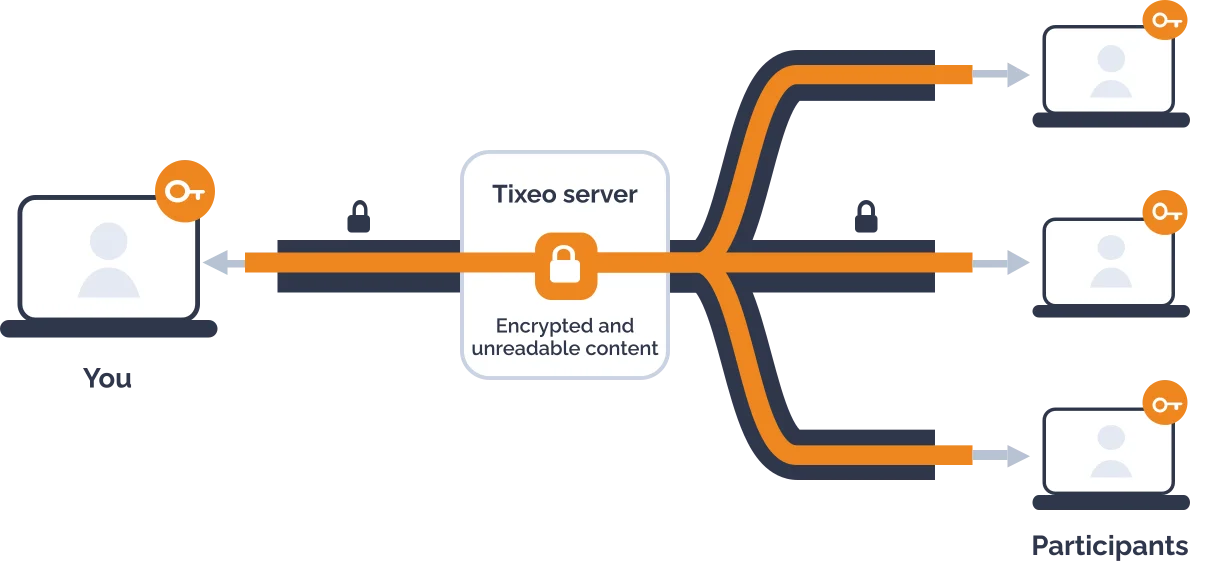
- Streams: audio, video, sharing, messages and files.
- TLS link encryption: protects each route between a device and the server.
- AES 256 end-to-end encryption: the content stays sealed from one participant to another, including on the server.


Your key is created on your device
Each time you connect, you are assigned an ephemeral encryption key that stays on your device. The Tixeo server never holds it at any point.
Keys are exchanged between participants
Your key is sent to the people you are talking to, and you receive theirs. Audio, video, screen sharing, messages and files are encrypted with these keys. The server routes sealed data that it cannot read.
A new key at every connection
No key is ever used twice. Anyone intercepting the exchanges would see nothing but a string of unreadable characters.

No mode to switch on
Elsewhere, end-to-end encryption is often an option that, once ticked, shuts off collaboration features. With Tixeo, it is in place by default on every security profile and needs no configuration: messaging, screen sharing and file transfer remain available.


Encryption technology in our own hands
The encryption engine is developed in France by Tixeo’s R&D teams. We do not wait for browsers or operating systems to move our algorithms forward: that is what allows us to bring post-quantum protection to the browser today.
Traffic between devices and servers is protected with TLS, and security is taken into account at every stage of design, following the Secure by design approach.
True or false: end-to-end encryption
“All video conferencing solutions offer end-to-end encryption”
False
 False
Many only offer link encryption, decrypted at server level, or point-to-point encryption between two participants. Others reserve it for an optional mode that disables some of the collaboration features.
“A solution subject to an extraterritorial law can be forced to give access to your communications”
True
 True
Providers subject to extraterritorial legislation, such as the US Cloud Act, may be required to respond to access requests from their authorities, including for data hosted in Europe. Without end-to-end encryption, the content of your meetings can be read by the provider, and can therefore be handed over.
Go private: a separate conversation in the middle of the meeting
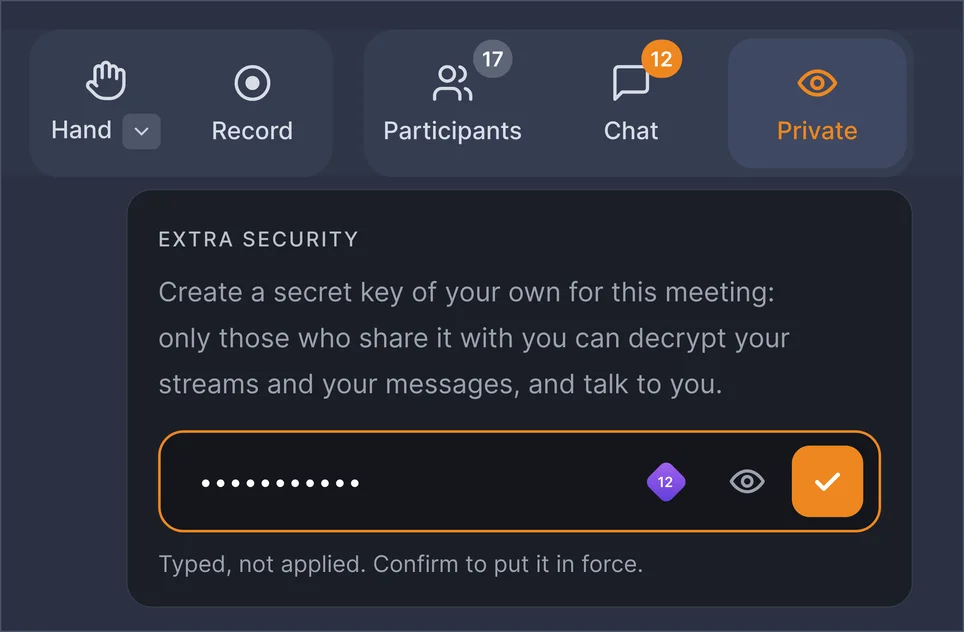
During a meeting, open a secret channel with one or more people. The code you share changes your encryption keys: the other participants can neither see you, hear you nor read your messages.
Agree on a code
By phone or text message, outside the meeting.
Click
 and enter the code
The button is in the main menu, at the top of the meeting. Each person enters the code on their own side.
Talk in private
Only those who have entered the same code can see and hear each other. One click is enough to remove the code and return to the meeting.

Check that you are talking to the right person
An impostor, even with a deepfake able to imitate a voice and a face, does not know the code: they cannot enter the tunnel.

Separate yourself from some of the participants
A confidential topic comes up in a meeting where not everyone has clearance? Deal with it separately with the people concerned, without leaving the meeting.

“In most video conferencing solutions, the browser is where end-to-end encryption fades away. At Tixeo, it becomes where it goes furthest.”

President of Tixeo

Tixeo, a European solution, complies with the General Data Protection Regulation (GDPR) and is not subject to any extraterritorial law.

Since 2017, ANSSI (France’s Cybersecurity Agency) has awarded Tixeo the CSPN (First Level Security Certification) four times, proof of reliability and commitment to cybersecurity.
Everything you need to know about end-to-end encryption in video conferencing
What is end-to-end encryption?
Data is encrypted on the sender’s device and decrypted only on the recipients’ devices. Intermediate servers never have access to the content of the exchanges.
Is Tixeo end-to-end encryption post-quantum?
The encryption of the communications itself is not threatened by quantum computers. The sensitive point is the exchange that sets up a meeting’s keys: in a browser, Tixeo reinforces it. The protection covers meetings and Workspaces when all participants are connected from a browser on version 18.2. With the mobile app or the native client, the key exchange relies on the classic mechanism, with the same end-to-end encryption.
What mechanisms does post-quantum protection rely on?
The exchange that sets up the keys combines X25519, the mechanism used today, with ML-KEM-768, standardised by NIST as FIPS 203. The two secrets are combined: the resulting key remains secret as long as either of the two mechanisms holds. This hybrid approach follows the rules set by ANSSI in its ANSSI-PG-083 guide, which rules out using a post-quantum mechanism on its own. It is carried out by Tixeo’s encryption engine, running in the browser, without depending on any browser or operating system function.
How do you enable end-to-end encryption in video conferencing?
There is nothing to enable. With Tixeo, it is active by default on all communications, with no configuration and without giving up native collaboration features. Post-quantum protection is added automatically in the browser, with no settings either.
Are all Tixeo features end-to-end encrypted?
All native collaboration features are: audio, video, screen sharing, messaging and files, in meetings and in Workspaces alike. Some options, such as SIP interoperability or live streaming, are not compatible with end-to-end encryption and are disabled depending on the security profile chosen.
Do my external participants get the same protection?
Yes. A participant with no account or installation who joins the meeting from their browser gets the same end-to-end encryption as your teams, reinforced by post-quantum protection as long as all participants are on version 18.2.
What is a backdoor?
A backdoor is secret access to communications, known to the provider and to the authorities for whom it was created. If a malicious third party discovers it, it becomes a way into all the exchanges.
Why is end-to-end encryption under threat?
Many legislators are seeking to weaken end-to-end encryption, claiming that it hinders the fight against crime and terrorism. However, such regulation puts the protection of sensitive data at risk, because cybercriminals can always use other encrypted channels.